What is Internet privacy & why you should care

حریم خصوصی ما در فضای آنلاین در معرض تهدید است، اما کارهای زیادی وجود دارد که می‌توانیم برای محافظت از خود انجام دهیم

IMG_2055.jpg
کیسی فورد، دکتراسرپرست ارتباطات
۱۲ mins read
Pablo: Improve quality
اشتراک‌گذاری

More and more of our daily lives are happening online and increasingly facilitated by single devices like smartphones. What we might not easily see, however, are the ways that our personal and collective privacy is being compromised right under our noses.

It’s natural to expect that what we do online should be private: when we browse the web, send an email to a loved one, or make purchases, why should any of these things be different than going to a library, mailing a letter, or buying something in a store?

This article explains the evolving idea of internet privacy, why it is important, and what the main threats to privacy online are.

حریم خصوصی در اینترنت به چه معناست؟

Internet privacy refers to the right to control personal data, online activities, and communications. It involves protecting information from tracking, surveillance, and unauthorized access by corporations, governments, ISPs, and cybercriminals through encryption, anonymity tools, and secure browsing practices.

Common questions about internet privacy

  • What kinds of information and activities should be considered “private” when passing through or occurring on the “public” web?
  • How much responsibility does a web company, with whom we share personal information, have to protect this data that they store?
  • What kinds of information can web services share with third parties, and what should they be prohibited from sharing?

Internet privacy: Jurisdictional efforts

Internet privacy has legal and jurisdictional definitions. While many constitutions protect personal privacy, online privacy lacked oversight at the web’s creation and remains a developing issue.

Governments are now recognizing internet privacy as a fundamental right. In the last decade, internet privacy has gradually risen to the level of public and legal attention, demanding governments recognize and work to protect it as a fundamental right of their citizens. Recent legislation like the General Data Protection Regulation (GDPR) in the European Union, which is the most robust governmental privacy protection law to date, is certainly an important step forward.

However, GDPR is regional, while the internet is global. برخی دولت‌ها به طور فعال شهروندان را زیر نظر دارند، سانسور اعمال می‌کنند و ابزارهای حفظ حریم خصوصی مانند شبکه‌های خصوصی مجازی (VPN) را در لیست سیاه قرار می‌دهند و دسترسی به اطلاعات و آزادی‌های دیجیتال را محدود می‌کنند.

VPN چی‌هست؟

Types of online data

There are two general legal classifications of data regarding your online privacy. As we will see below, the difference between them is crucial but also insufficient.

ویژگی‌ها

Definition

Personally identifying information (PII)

Any personal information that can be used to directly identify a person, such as your name or address.

Non-PII

Data that has no personal reference to begin with (such as weather data), or PD that has been pseudo- or irreversibly anonymized, making the data unlinkable back to the person.

For example, if you post something to an online message board under a pseudonym, the content of your post is technically non-PII. And if a statistical analysis publishes user traffic data connecting to a particular website after removing IP addresses from the data set, the result is non-PII. But if you disclose your real name in a message, then this information can be linked to your IP address and become PII.

The problem of metadata leakage

The content of our communications (and thus a lot of our PD) is mostly protected these days, with end-to-end encryption becoming the norm. However, in the age of AI, encrypting your online traffic is not enough. This is because of the sophisticated systems harvesting, analyzing, and selling our metadata all across the web, usually without our knowledge and with dubious consent practices (or none at all).

Metadata technically means “data about data,” or the information about the message in the case of communications. It includes information like:

  • IP addresses (what device is connected to what online service), -Timestamps (when a message was sent or a connection made)
  • Duration (how long a connection lasted)
  • Frequency (how often a connection or contact was made over time).

So even if someone can’t read your actual message, there is a lot of information about what you’re doing online that is leaking from your traffic.

Unlike encrypted data, metadata has no legal protections. And while it is not exactly PD, large enough amounts of it in the hands of artificial intelligence (AI) systems can analyze it to deduce a lot of personal information about us. And this information can be the basis of crybersecurity threats, hacking, and censorship.

فراداده چیست؟
What are the main threats to privacy on the internet?

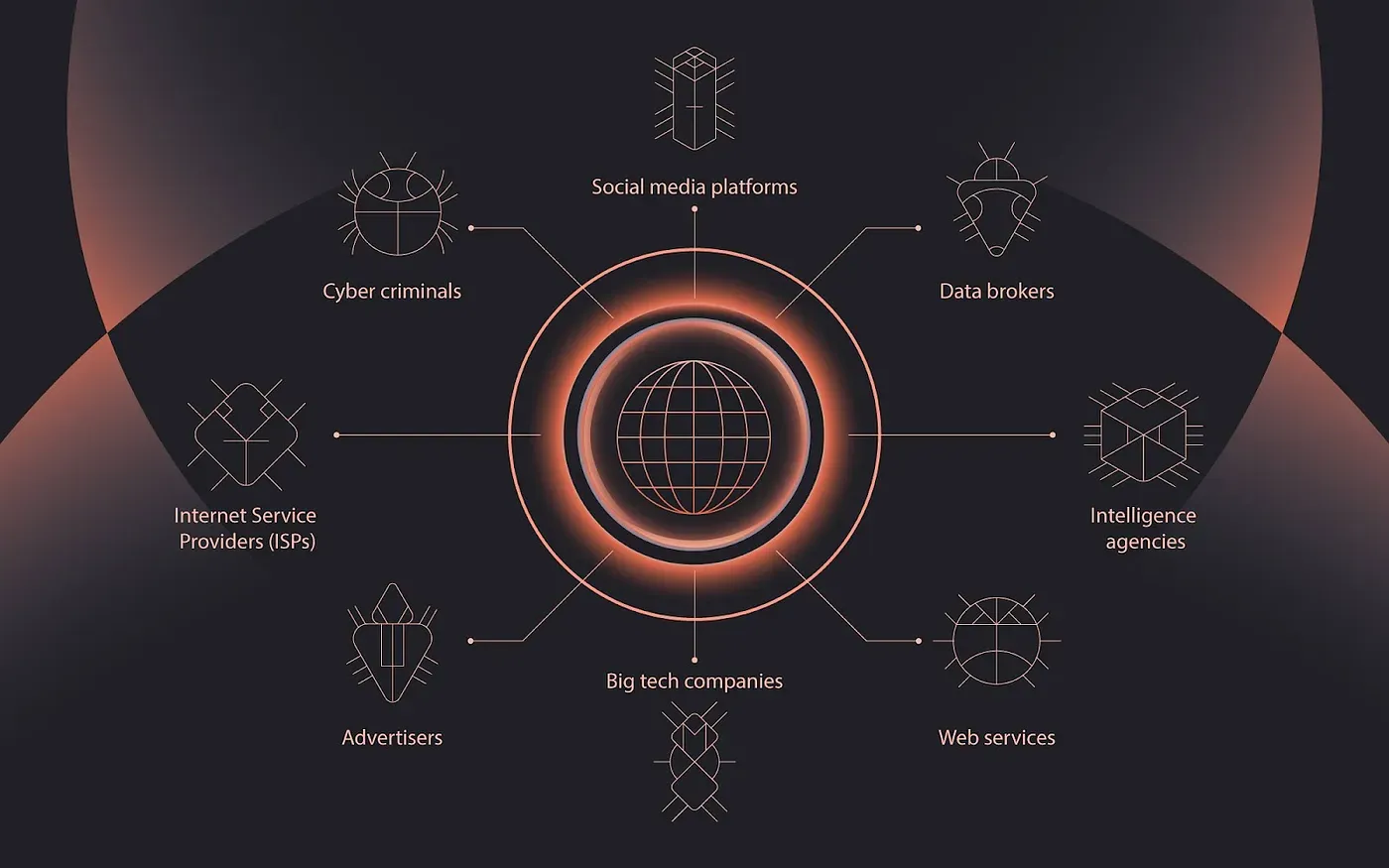
How can we be said to have any control over our privacy online when the future of our data is out of our hands from the moment we click on anything? Unfortunately, defending our privacy online is a multi-front battle against many possible enemies who are constantly at work in tracking us. Here are the big threats to look out for:

Cyber crime and hacking

Cybercrime is a major global threat, impacting finances, security, and privacy. Hackers operate individually or as organized groups with advanced resources. With access to personal data (credit cards, IDs, medical records), they commit identity theft, fraud, and online impersonation.

Attacks occur through intercepted data, device breaches, or hacks targeting website and VPN databases. Sophisticated tracking also helps cybercriminals exploit online activities.

Internet tracking

Online activity is constantly tracked by websites, services, and third parties. While some tracking supports functionality, commercial services compile user data for targeted advertising and profiling.

Aggregated data reveals behaviors, trends, and preferences, making users vulnerable to manipulation, such as political targeting based on AI-identified biases. Tracking isn't limited to corporations: individuals face stalking, harassment, and data exploitation, making online privacy essential for safety.

Mass surveillance

Beyond website tracking, governments conduct mass surveillance, accessing user data through telecom companies and tech giants like Google and Facebook. Intelligence agencies worldwide coordinate efforts to monitor online communications. Even if you trust a web service or VPN, your data remains vulnerable to government access, regardless of whether you've done anything wrong.

Censorship

Governments worldwide are increasingly placing restrictions on what information people can and cannot access. Enforcing censorship restrictions involve surveillance of network traffic and the cooperation with Internet Service Providers (ISPs) to block user connections. This surveillance can also lead to the legal and political targeting of individuals seeking to bypass censorship laws.

What to avoid doing to protect your internet privacy

The first stage in defending our privacy online should be to reduce our vulnerabilities. We cannot simply wait for governments and regulatory bodies to secure our internet privacy. It is necessary for every user to take matters into their own hands. Here are some concrete things and practices to avoid in order to better protect your privacy online.

Don't use the same credentials for multiple accounts

If your passwords and login IDs are revealed to hackers or cyber criminals from one web server’s databases, your other accounts online that use the same login credentials can also be compromised. Try to vary your passwords between accounts. Password managers can help get these organized and protected.

Don't stay logged in to websites

When you stay logged into websites over a period of time, the cookies installed on your browser store information related to your credentials and browsing history, among other data. This can increase the risks of cyber attacks like session sniffing, or even session hijacking when an adversary gains access to your account to impersonate you online. Moreover, if your device is lost, it can give thieves access to your account. The longer you stay logged in, the higher the risks.

Don't blindly accept Terms & Conditions

Terms & Conditions often include clauses allowing companies to share user data with third parties. Users face a dilemma: accept and risk data exposure or decline and lose access. When possible, choose services that respect privacy and avoid hidden tracking policies.

Phishing attacks and malware are major cyber threats. Fraudulent emails mimic trusted sources to steal personal information. Clicking suspicious links or downloading files can install malware, granting hackers access to your device. Stay cautious and verify sources before engaging with unknown content.

Concrete tips on how you protect your online privacy

There is a lot users can do to better protect their own privacy and security online. This is Nym’s non-exhaustive list of key practices:

Secure your web browser

There are many ways users can manually secure their web browser for safer and more private web browsing. The first is to keep your browser updated: updates often make your browser aware of new security threats to detect. اقدامات تکمیلی شامل نصب افزونه‌های ضدتبلیغات و ضدبدافزار، فعال‌سازی قابلیت‌های «do not track» در صورت وجود، محدود کردن یا پاک‌سازی منظم کوکی‌ها، و غیرفعال کردن افزونه‌های غیرضروری (که ممکن است ترافیک شما را ثبت کنند) است. These multiple steps can be expedited by choosing a web browser known for its privacy protections.

Use a VPN

VPNs encrypt your online traffic and route it through another server(s), masking your personal IP address before your data reaches the public web. New decentralized VPNs like NymVPN protect user privacy ever more robustly than traditional VPNs by using multi-server routing, unlinkable architectures, and advanced encryption protocols.

Keep your software up-to-date

به‌روزرسانی‌های نرم‌افزاری برای دستگاه‌ها و اپلیکیشن‌های شما اغلب شامل قابلیت‌های امنیتی جدیدی هستند، مانند فهرست‌های به‌روزشده از تهدیدهای شناخته‌شده، آدرس‌ها و وب‌سایت‌های مخرب و بدافزارها.

Install an anti-virus program and activate firewalls

Depending on your operating system, anti-virus software can help protect your system from viruses and malware attacks from leaking your personal information. Firewalls can help relegate what information can go in and out of your device, and even prevent certain sources (like known ad servers) from connecting with you.

Cookies are pieces of data installed on your browser by websites. They are used to track your activities across multiple sessions, for example, to remember your login credentials and to tailor advertising and content to you. Deleting your cookies manually through your browser can help avoid tracking, but users should know that advanced cookies (like evercookies and zombie cookies) can persist and resurrect themselves after clearing. When a web service asks you to accept cookies (usually in terms of “essential” or “unessential” ones), you can choose to deny the request.

Adjust your settings on Google, Facebook, etc.

Many of these Big Tech platforms now include user privacy customization settings which can allow a limited amount of control over what kinds of data is collected. This may reduce the risks of data tracking, but it certainly will not solve the problem.

Use secure and reliable websites

HTTPS is an encryption protocol for the public web. Many sites and services now secure the content of users’ activities from end-to-end while accessing their platforms. Make sure any website you are visiting is secured by checking for the lock logo next to the URL in your browser. Using a VPN can guarantee that your data is always encrypted no matter what you access, and will make your data double encrypted in most cases.

Secure online communications

Make sure to use messaging platforms that are end-to-end encrypted, and preferably decentralized VPNs for highly sensitive communications.

Read more from Nym on which end-to-end encrypted messengers to use like Signal.

Share online files securely

How you share your files online is very important. Make sure that all connections are encrypted so that the content of what you are sending cannot be easily intercepted and read in transit. Only share files with known parties, and do not open files from unknown parties under any circumstances.

Use multi factor authentication (MFA)

MFA is a process that involves verifying your credentials on your other devices before accessing a service. For example, 2FA in signing into your email account from your computer might require you both sign into service on one device while also receiving a code on a second device (like a mobile phone) before accessing. This can allow a service to verify that it’s really you when they detect suspicious login attempts (for instance, if you’re using a VPN or a new browser, or if someone is trying to login into your account from their own device).

Privacy isn't a setting

It's a practice. Start with the right tools.

Earlybird-email banner (1).webp

The future of online privacy

There is perhaps a common misconception that people need extra privacy online because they are breaking the law or have something to hide. But this is a false assumption. Due to the systematic ways that everyone’s data globally is being harvested, surveilled, and exploited, it is necessary to adopt self-defensive privacy measures.

This will continue to be an ongoing struggle as both online tracking and privacy technology co-evolve. Thankfully, as we’ve seen, there are many concrete things we can all do to protect ourselves online.

NymVPN is here to provide you with one crucial tool in this struggle: a VPN built on a novel mixnet to maximally anonymize all of your online traffic.

Whether you’re using Nym’s 2-hop Fast mode or its unparalleled 5-hop Anonymous mode for highly sensitive traffic, users can avoid the security risks posed by centralized VPN services. The choice also allows users to custom configure what traffic needs robust protection and what less sensitive activities (like gaming) need increased speed.

Internet privacy: FAQs

Privacy is multi-layered—VPNs encrypt and route traffic, while browser protection (e.g. anti‑fingerprinting tools, script blockers) guards against cross-site tracking and device fingerprinting.

Emerging DID frameworks let users authenticate or transact pseudonymously without revealing identity, shifting control from centralized authorities to user‑controlled protocols.

Yes—repeated session timings, site visit sequences, and packet sizes can reveal identity unless traffic-obfuscation tools (like mixnets or cover traffic) are used.

VPNs protect traffic across all these, but mobile carriers may still see metadata such as connection behavior. Mixnets or rotating exit nodes help reduce persistent metadata profiling.

Projects with open-source clients, third-party audits, and verifiable reputational systems give users verifiable trust—not just policy promises.

درباره نویسندگان

IMG_2055.jpg

کیسی فورد، دکترا

سرپرست ارتباطات
Casey is the Head of Communications, lead writer, and editorial reviewer at Nym. او دارای مدرک دکترای فلسفه است و دربارهٔ هم‌پوشانی فناوری‌های غیرمتمرکز و زندگی اجتماعی پژوهش می‌کند.
Ania-Piotrowska.jpg

دکتر آنیا ام. پیوتروسکا

بازبین فنی
آنیا مدیر ارشد علمی Nym است. او بر امنیت، سیستم‌های توزیع‌شده و ارتباطات ناشناس، از جمله مسیریابی پیازی و شبکه‌های ترکیبی تمرکز دارد.

New low prices

خصوصی‌ترین VPN حال حاضر جهان

Try NymVPN for free

خواندن را ادامه دهید...

nym network.webp

Nym فراتر از یک VPN است

The first app that protects you from AI surveillance thanks to a noise-generating mixnet
۲ دقیقه خوانده